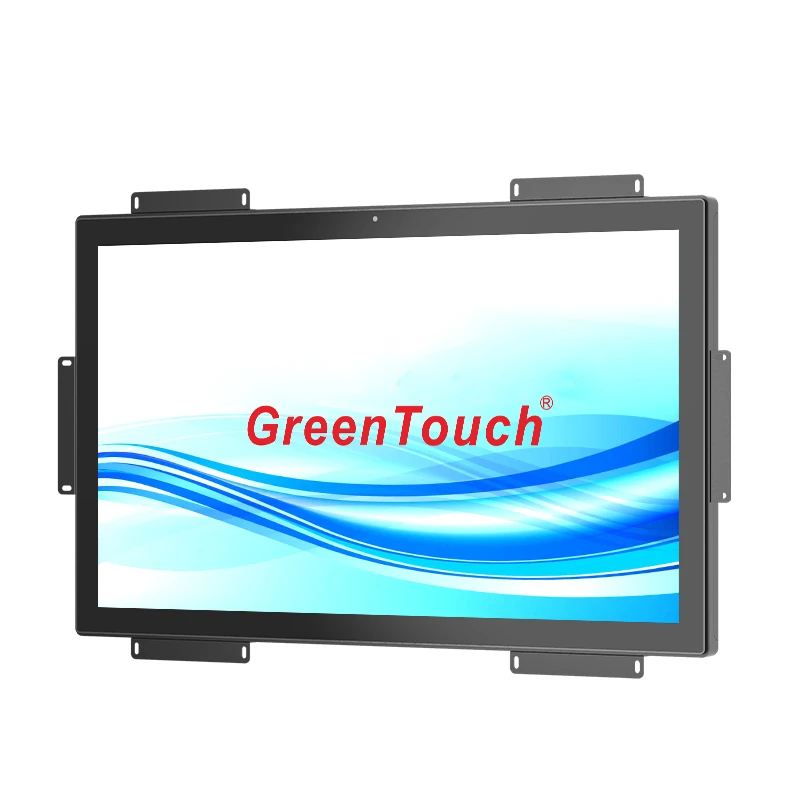

SHENZHEN, GUANGDONG, CHINA, September 24, 2026 /EINPresswire.com/ — Procuring a global touch display for interactive project rollouts requires technical evaluation that extends beyond screen size and unit price. For system integrators, kiosk builders, and interactive terminal operators, display hardware must integrate into custom enclosures, interface with diverse computing platforms, and withstand continuous public or commercial use. Overlooking structural mounting specifications, signal connectivity, front protection, and long-term component availability frequently leads to assembly rework, elevated field service rates, and premature equipment obsolescence.
Evaluate Touch Displays as Part of the Whole Project
A commercial touch display functions as an integral element of an interactive terminal. Display selection must account for the host cabinet structure, ambient lighting levels, operating temperature extremes, and user interaction profiles. Interactive directories in corporate lobbies face different mechanical and optical demands than automated transit ticketing machines or hospital check-in terminals.
Evaluating the complete system requires examining structural housing options, cable routing constraints, power conversion architectures, and service access paths. Sourcing from a supplier that provides engineering collaboration from the concept phase allows hardware teams to align display dimensions, bracket geometry, and controller protocols with host enclosure requirements.
Compare Display Resolution Separately from Touch Capability
Resolution controls image detail, while the touch digitizer governs interaction response. Commercial interactive projects sometimes over-specify 4K resolution where 1080p full HD offers optimal viewing distance clarity, lower GPU rendering loads, and cooler operating temperatures. Sourcing teams should evaluate resolution against operator viewing distance.
Touch digitizer performance operates independently of pixel density. Projected capacitive controllers require high internal scan rates (above 100 Hz) to deliver low-latency tracking, regardless of whether the LCD is full HD or ultra-high definition. Balancing display resolution with touch controller bandwidth ensures smooth operation without driving up hardware costs.
Compare Enclosure Form Factors for Equipment MountingOpen-Frame Flanges and Flush Embedded Architectures
Open-frame formats support equipment integration, embedded chassis fit behind custom cabinet cutouts, and panel-mount enclosures compress against front bezels with silicone gaskets to achieve IP65 front protection. Selecting an enclosure form factor dictates cooling architecture, cable routing, and service access. Rear VESA 75×75 mm and 100×100 mm mounting hole patterns provide secondary mounting on articulating arms.
Desktop Enclosed Monitors and Large-Format Visual Walls
Desktop touch monitors feature fully enclosed molded housings with integrated tilt stands, suitable for point-of-sale checkout counters and medical diagnostic carts. Large-format interactive visual walls incorporate ruggedized aluminum frames and front impact-resistant tempered glass, withstanding continuous public touch interaction across airport terminals and commercial venues.
Compare Connectivity as a Signal Chain
Display connectivity encompasses the entire signal path: video input, touch data communication, DC power input, and auxiliary control. Industrial and commercial interactive projects require dependable, standardized interfaces to ensure compatibility with host controllers ranging from industrial PCs to embedded Android media engines.
Comprehensive connectivity relies on standard video inputs including HDMI, DisplayPort, and legacy VGA or DVI for existing system retrofits. Touch data transmission standardizes on USB 2.0 HID protocols for driverless plug-and-play operation across Windows, Linux, and Android operating systems. For installations subject to high electrical noise or long cable runs, RS-232 serial touch interfaces provide reliable alternative communication channels.
Modern installations also evaluate emerging single-cable interfaces such as USB Type-C, which can deliver video, touch data, and power over a single connection. However, commercial hardware designs prioritize port stability, utilizing locking screw flanges on video connectors and captive hardware on power and USB cables to prevent vibration-induced disconnects.
Compare Protection and Operating Conditions
Front ingress and impact ratings apply specifically to the exposed front surface and must be matched to the installation environment. For retail and indoor kiosks, an IP54 or IP65 front rating prevents liquid spills and cleaning chemicals from entering the cabinet. In outdoor or high-traffic public terminals, IP65 water ingress protection combined with IK08 impact-resistant tempered glass protects against weather exposure and vandalism.
Optical performance under varied lighting conditions is equally critical. Anti-glare (AG) surface etching diffuses overhead fluorescent and solar reflections, preserving readability in bright indoor lobbies. Anti-reflective (AR) coatings reduce surface reflection while maintaining high light transmission, and anti-fingerprint (AF) oleophobic treatments reduce grease accumulation from repeated user contact.
Direct optical bonding eliminates the internal air gap between the cover glass and the LCD panel, improving contrast in bright environments and eliminating condensation issues in humid or temperature-fluctuating environments.
Compare Supplier Support for Samples and Integration
A comprehensive supplier evaluation examines engineering documentation, sample availability, technical support, and component lifecycle roadmaps. Detailed 2D outline drawings and 3D CAD files enable mechanical designers to verify clearances and cable routing before ordering prototypes. Fast-turnaround evaluation samples allow engineering teams to validate touch responsiveness, display quality, and chassis fit in realistic testing scenarios.
Long-term product continuity from GreenTouch ensures that display dimensions, mounting hole locations, and controller firmware remain consistent throughout multi-year project deployments, protecting buyers from costly redesigns.
FAQ about Global Touch Display Selection
Procurement managers and commercial system integrators frequently consult our technical team regarding these common project questions.
Is the Largest Screen Automatically the Best Choice?
Screen sizing must match viewing distance, user interaction ergonomics, and physical space constraints. A 15-inch to 21.5-inch display is ideal for individual kiosk interactions, while 32-inch to 65-inch screens serve group wayfinding and digital signage.
Does 4K Resolution Guarantee Accurate Touch Performance?
Optical resolution and touch digitizing are distinct hardware subsystems. A 4K display provides crisp visual detail, but touch accuracy depends on sensor pitch, controller processing speed, and firmware filtering algorithms.
How Does Optical Bonding Enhance Public Interactive Displays?
Direct optical bonding fills the internal air gap between cover glass and LCD panel with optical silicone adhesive. This eliminates internal reflections, improves outdoor readability, prevents condensation in humid environments, and increases structural impact resistance.
Build a Project-Specific Touch Display Shortlist
Developing an interactive display rollout requires balancing visual resolution, touch responsiveness, mechanical mounting flexibility, and long-term component availability. Comparing open-frame, desktop, and panel-mount formats alongside connectivity and ingress protection allows buyers to select hardware that satisfies both commercial and technical requirements. Technical procurement teams and system integrators can explore display options and submit project specifications directly at https://www.greentouch.com.cn/ for engineering review and tailored sample evaluation.
ShenZhen GreenTouch Technology Co.,Ltd.
GreenTouch
email us here
Visit us on social media:
LinkedIn
Facebook
YouTube
Legal Disclaimer:
EIN Presswire provides this news content “as is” without warranty of any kind. We do not accept any responsibility or liability
for the accuracy, content, images, videos, licenses, completeness, legality, or reliability of the information contained in this
article. If you have any complaints or copyright issues related to this article, kindly contact the author above.

Media gallery